In this article
- What the Meta Marketing API Actually Is
- Do You Actually Need It?
- API vs. Ads Manager
- Setting Up Access
- 1. Create the developer app
- 2. Connect Business Manager
- 3. Permissions
- 4. Tokens, get this part right (seriously)
- Verify before you build
- First call
- Creating Campaigns Programmatically
- The campaign object
- Ad sets
- Ads and creatives
- Batching
- The Insights API
- The actions array
- Attribution windows
- The Conversions API
- Run it alongside the pixel with deduplication
- Advantage+ via the API
- Rate Limits, Errors, and the Stuff That Breaks at 1am (Maybe)
- Rate limits
- Error codes worth memorizing
- Recurring gotchas
- Meta Marketing API version
- Multi-Account Workflows for Agencies
- Partner access, not credential sharing
- One system user, many accounts
- Reporting across fifty accounts
- Expect variation
- FAQ
- Is the Marketing API free?
- Do I need App Review?
- Marketing API vs. Graph API, Chad what’s the difference?
- Where’s my ad account ID?
- How often do new versions ship?
- Does this cover Instagram ads?
- Best token type for production?
- What about iOS 14?
If you’ve ever spent a Monday morning exporting CSVs from Ads Manager for twelve different accounts, this guide is for you. The Meta Marketing API exists so software can do that job instead creating campaigns, moving budgets, pulling reports, and once you’re past a certain scale there’s really no other sane way to run things.
That said, most advertisers don’t need it, and I want to be upfront about that before walking you through setup. Ads Manager handles one account perfectly well. The API starts earning its keep when the interface itself becomes the bottleneck: dozens of accounts, hundreds of live campaigns, weekly creative rotations, reporting that has to land in a warehouse instead of a spreadsheet.
This guide covers the whole arc, how the pieces of the API ecosystem fit together, authenticate without losing a day to token problems, programmatic campaign creation, Insights reporting at scale, plus the topics most write-ups quietly skip: the Conversions API, Advantage+ campaign types, version management, error handling, and the multi-account patterns agencies depend on.
What the Meta Marketing API Actually Is
Strip away the branding and it’s a set of Graph API endpoints that talk to the same advertising infrastructure Ads Manager does. Same campaigns, same delivery system, different access point. Your application sends an HTTP request, Meta processes it, structured data comes back. Every third-party ad tool you’ve ever seen managing Meta campaigns is built on exactly this, like Hootsuite, Sprout Social, and even Semrush Social Media Management Toolkit.
Where newcomers get tangled up is in assuming it’s one API. It isn’t. There are three functional areas, and in practice you’ll touch at least two:
The Meta Marketing API is a set of Graph API endpoints that allows applications to interact with Meta’s advertising infrastructure programmatically. When someone says “Meta Marketing API” without qualification, this is what they mean.
The Ads Insights API is the reporting layer that sits on top. The core API tells you what an ad is; Insights tells you how it performed. Delivery, cost, conversions, and engagement, with breakdowns by date, geography, platform, and demographics. One thing worth knowing before you write any code: Insights requests are asynchronous. You submit a report job and poll for the result. More on that later because it shapes your whole pipeline design.
The Ad Library API is the odd one out, programmatic access to publicly visible ads, useful for competitive research. Temper your expectations here. Access is gated, spend and impressions come back as ranges rather than exact figures, and you won’t get CTRs at all. It tells you what competitors are running and roughly how hard they’re pushing it, not how well it’s working.
| API | What it’s for | Typical user |
|---|---|---|
| Marketing API (core) | Creating and managing campaigns, ad sets, ads | Developers, growth engineers |
| Ads Insights API | Performance data and reporting | Data teams, performance marketers |
| Ad Library API | Competitor ad research | Strategists, researchers |
All three live inside Meta’s broader Graph API, where every object is a node and the connections between them are edges. The Marketing API is a specialized slice of that graph, scoped to advertising.
Do You Actually Need It?
Probably not. Honestly I say that as someone arguing you should read the rest of this guide anyway.
Plenty of advertisers spending real money every month are better served by Ads Manager, or by a third-party tool that already wraps the API for them. The integration has a learning curve, and it comes with a recurring cost of time and effort to keep things running. Every quarterly version release is a potential breaking change someone has to check. That cost only makes sense in a handful of situations.
The clearest one is multi-account management. Try running campaigns for thirty clients through a browser and you’ll feel the problem in your wrists before the end of week one. The API gives you bulk operations and unified reporting from a single codebase, and there’s no browser-based equivalent.
Automation is the second. Budget pacing rules, creative rotation schedules, automated bid adjustments, and dayparting logic, none of it exists without programmatic control. Ads Manager’s built-in rules cover maybe ten percent of what teams actually want to automate.
Then there’s data plumbing. If your reporting lives in a warehouse or a BI tool, the API pulls structured data on a schedule and the Monday morning CSV ritual ends. If you’re building an ad tech product, there’s no decision to make, the Marketing API is the only way in. And if you’re implementing server-side conversion tracking, the Conversions API (covered below) requires direct integration.
If none of those describe your situation, you can proceed close this tab and go optimize a campaign instead. The API will still be here when you scaling up your workflow.
API vs. Ads Manager
These aren’t competitors. They’re two interfaces to the same machine, and the question is never “which one is better”. It’s which one fits the operation in front of you.
| Differences | Ads Manager | Marketing API |
|---|---|---|
| Interface | Visual, in the browser | HTTP requests, your code |
| Setup | None | App, tokens, permissions, review |
| Automation | Basic rules | Anything you can write |
| Multi-account work | One at a time, manually | Native |
| Reporting | Pre-built dashboards | Any metric, any breakdown, any destination |
| Ongoing maintenance | None | Version upgrades, token management |
The browser wins on speed for one-off work. The visual layout also surfaces anomalies you’d miss scanning raw JSON.
The API wins everywhere volume matters. Most teams I’ve worked with end up using both: Ads Manager for daily review and quick interventions, the API for bulk operations, scheduled reporting, and anything that runs while people sleep.
Setting Up Access
Four ingredients: a developer app, a Business Manager connection, permissions, and a token. The whole thing takes under an hour to setup. Here’s how you configure Meta Marketing API.
1. Create the developer app
Go to developers.facebook.com and create a new app.
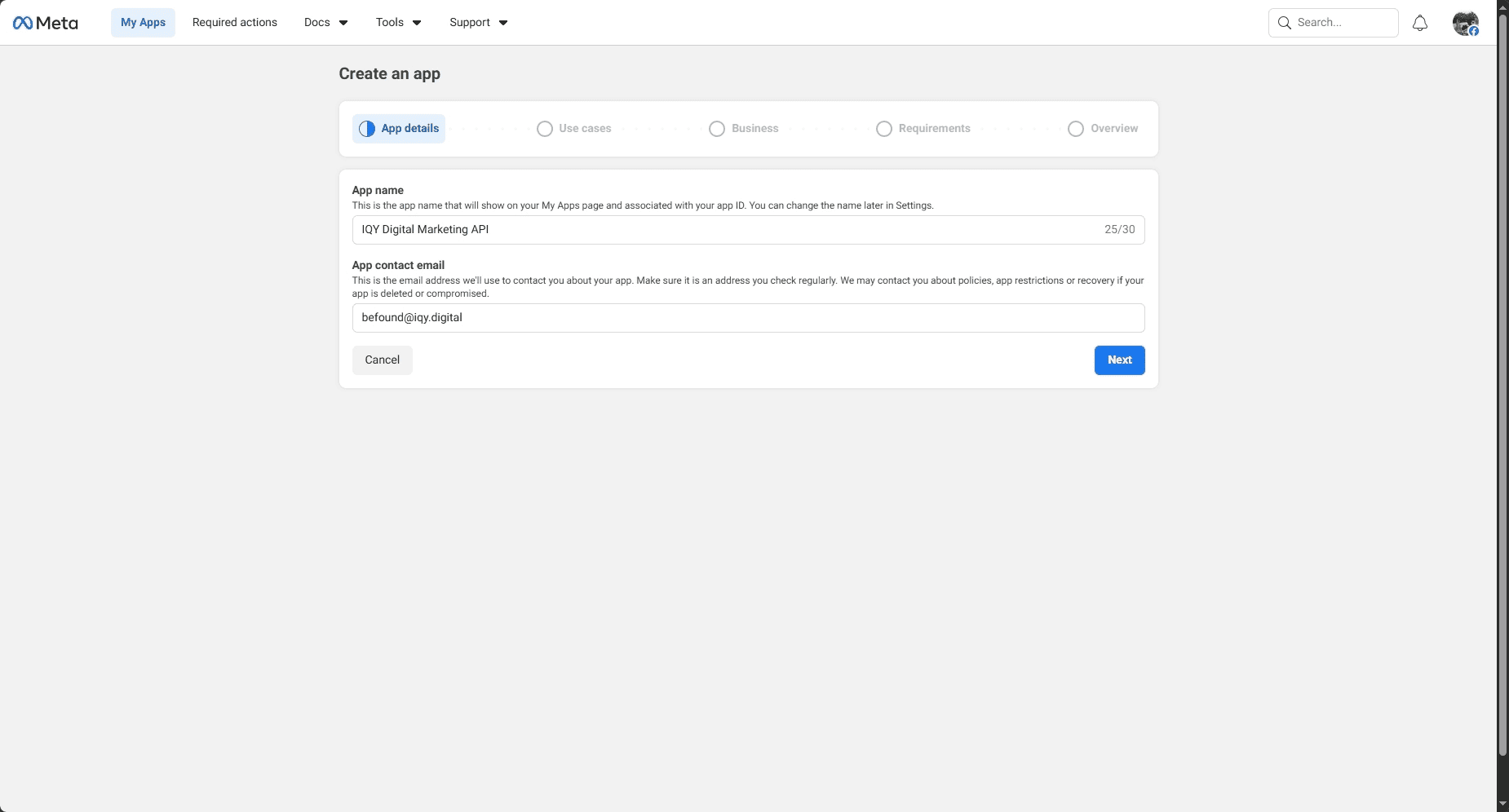
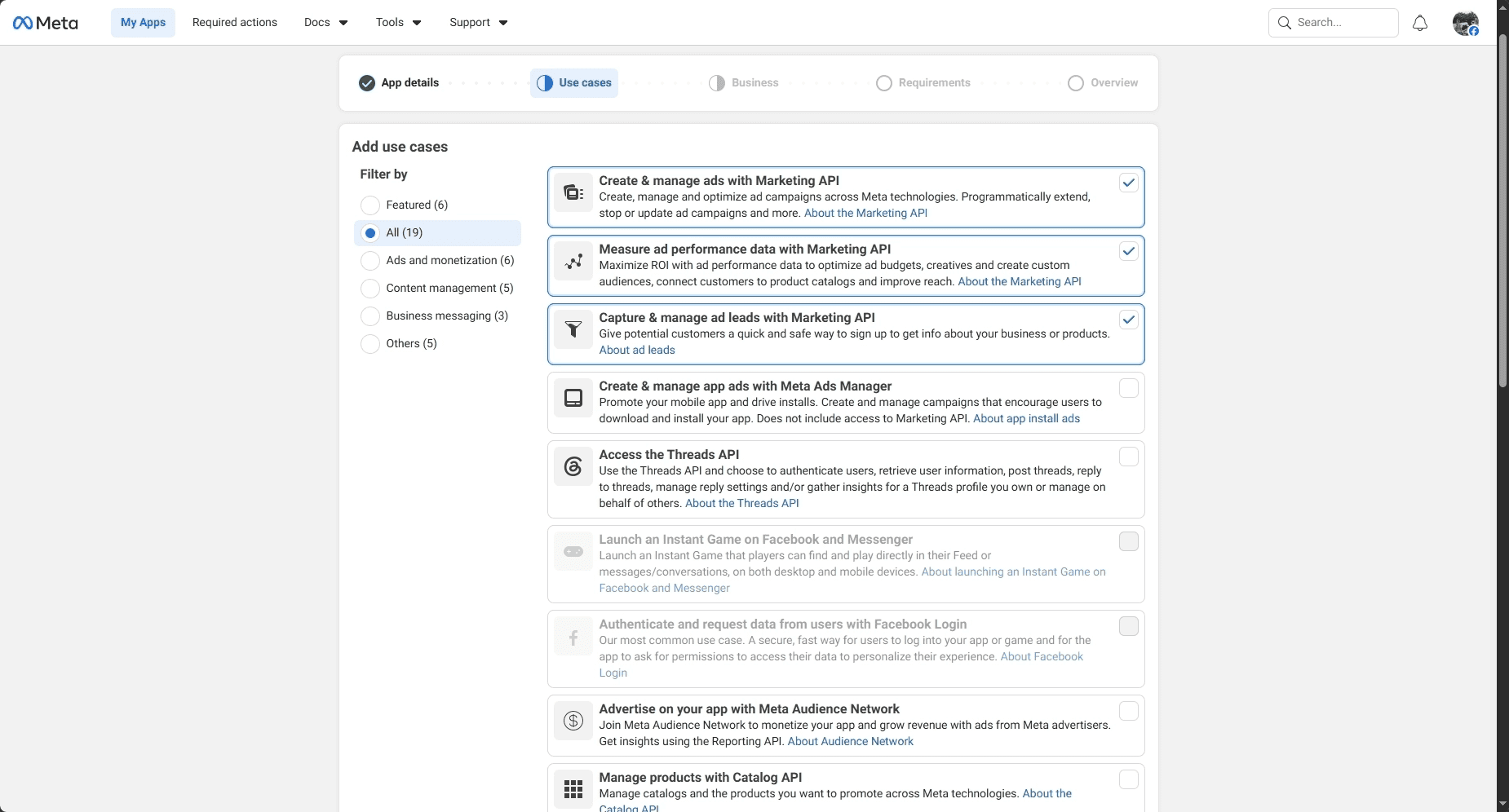
Then, in the app dashboard, find Use Cases and add Marketing API. That switches on the advertising endpoints.
2. Connect Business Manager
The app needs to be attached to a Business Manager account (Meta now calls the surrounding interface Business Suite, but everyone still says Business Manager). Under Business Settings → Apps, add your new app.
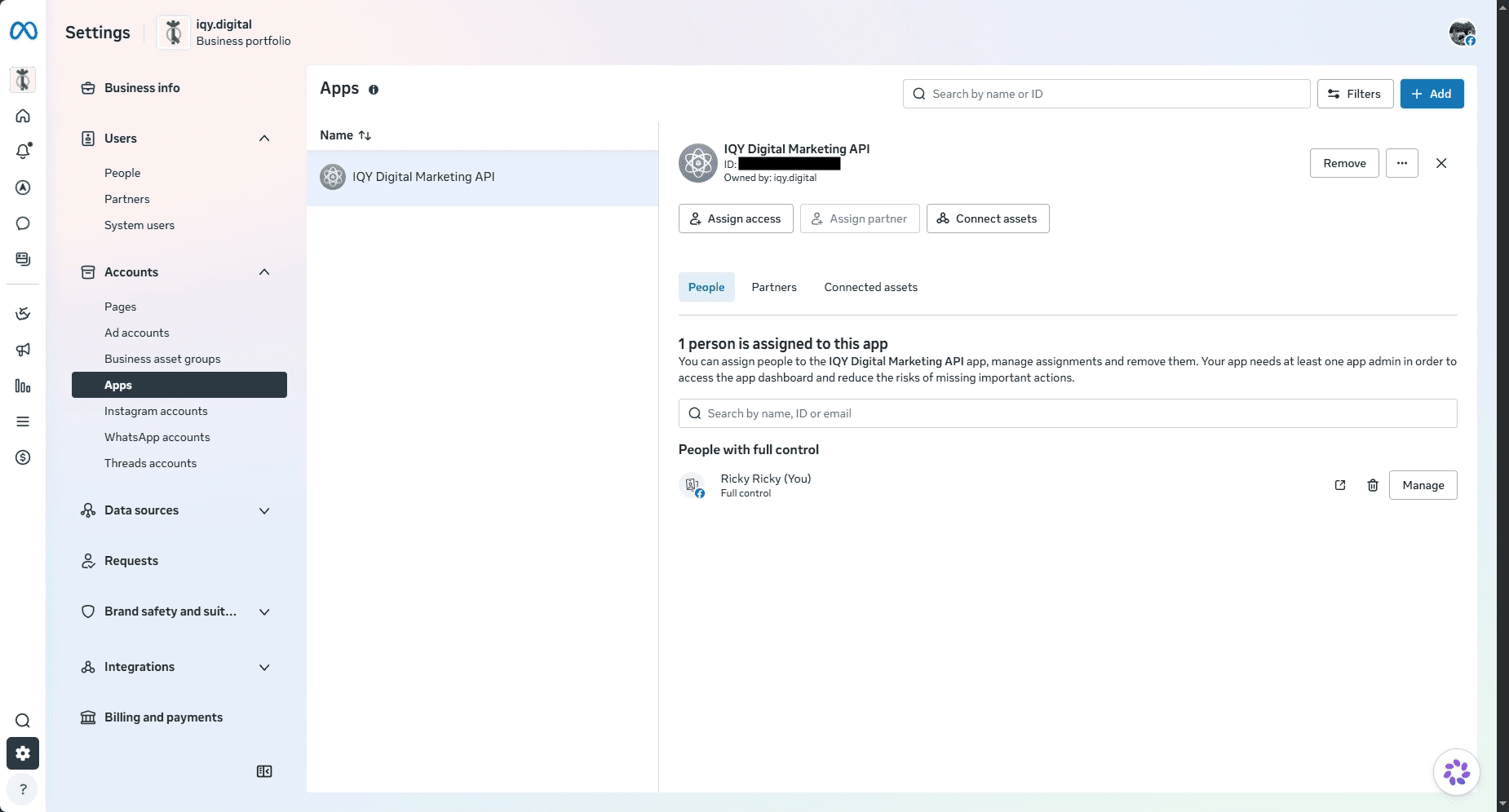
For agencies, a word of advice: when you need access client ad accounts, use partner access. Have the client grant your Business Manager access from their side. Do not collect client credentials or personal tokens, it’s an audit nightmare, it breaks the moment someone changes a password, and partner access exists precisely so you never have to do it.
3. Permissions
Access control runs on OAuth 2.0 scopes. Three matter for advertising work:
ads_read– read-only access to account data and insightsads_management– read and write; campaign creation lives herebusiness_management– Business Manager assets, including pages and ad accounts
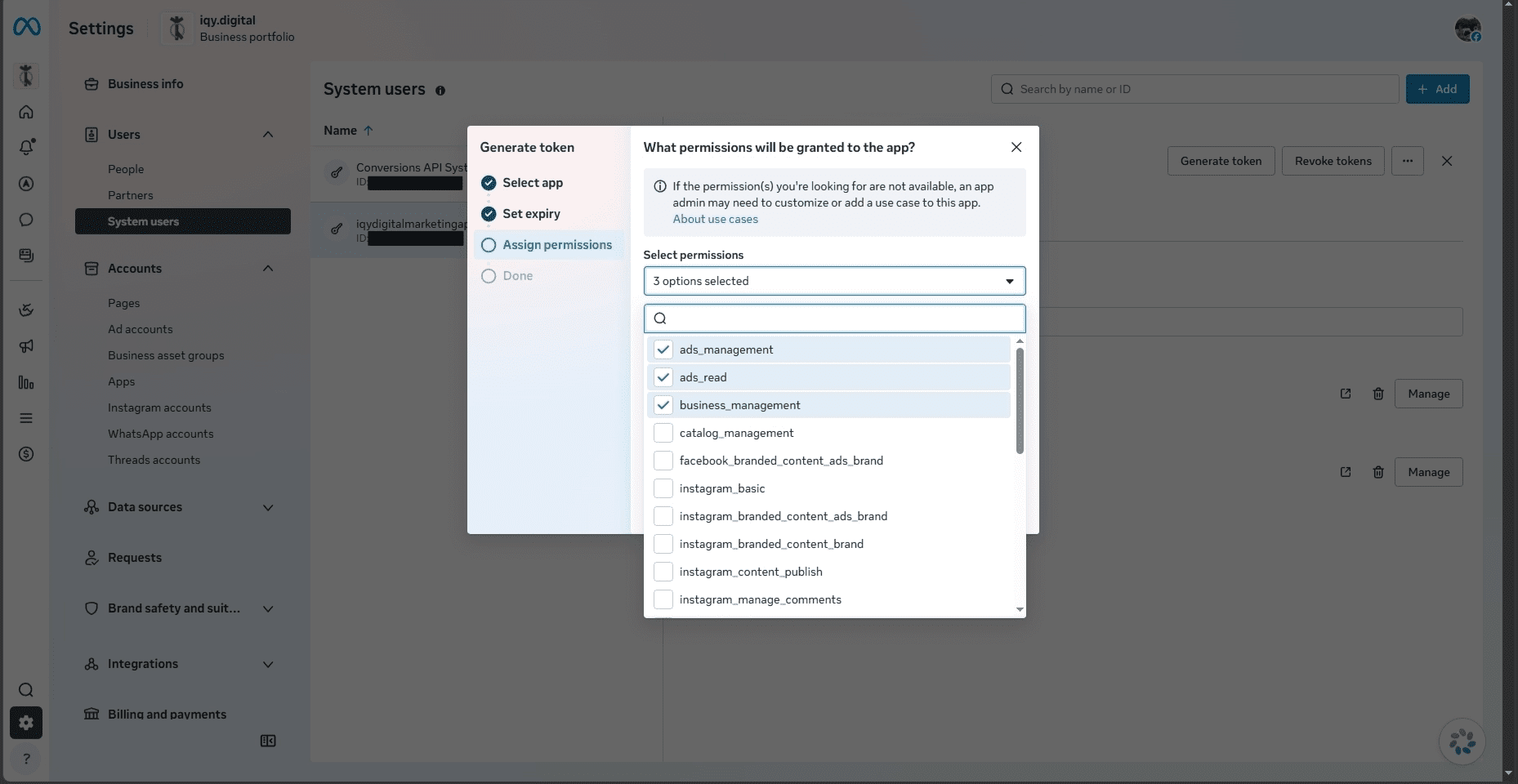
If your production app touches data belonging to other users or businesses, Meta’s App Review stands between you and advanced permissions. For testing against your own accounts, development mode lets you skip it entirely.
4. Tokens, get this part right (seriously)
Every request authenticates with an access token, and the type you pick matters more than the rest of the setup combined.
Short-lived user tokens come out of the OAuth flow and expire in about an hour. Fine for poking at endpoints in a REPL, useless beyond that. Long-lived user tokens last 60 days after a server-side exchange, which sounds workable until the refresh you meant to automate doesn’t happen and your pipeline dies on a weekend.
What you want for production is a system user token. A system user is a non-human identity inside Business Manager, it represents your application rather than a person, its tokens don’t expire, and it doesn’t break when an employee leaves or gets their personal account flagged. Create one under System Users in Business Manager, grant it the ad account permissions it needs, generate a token.
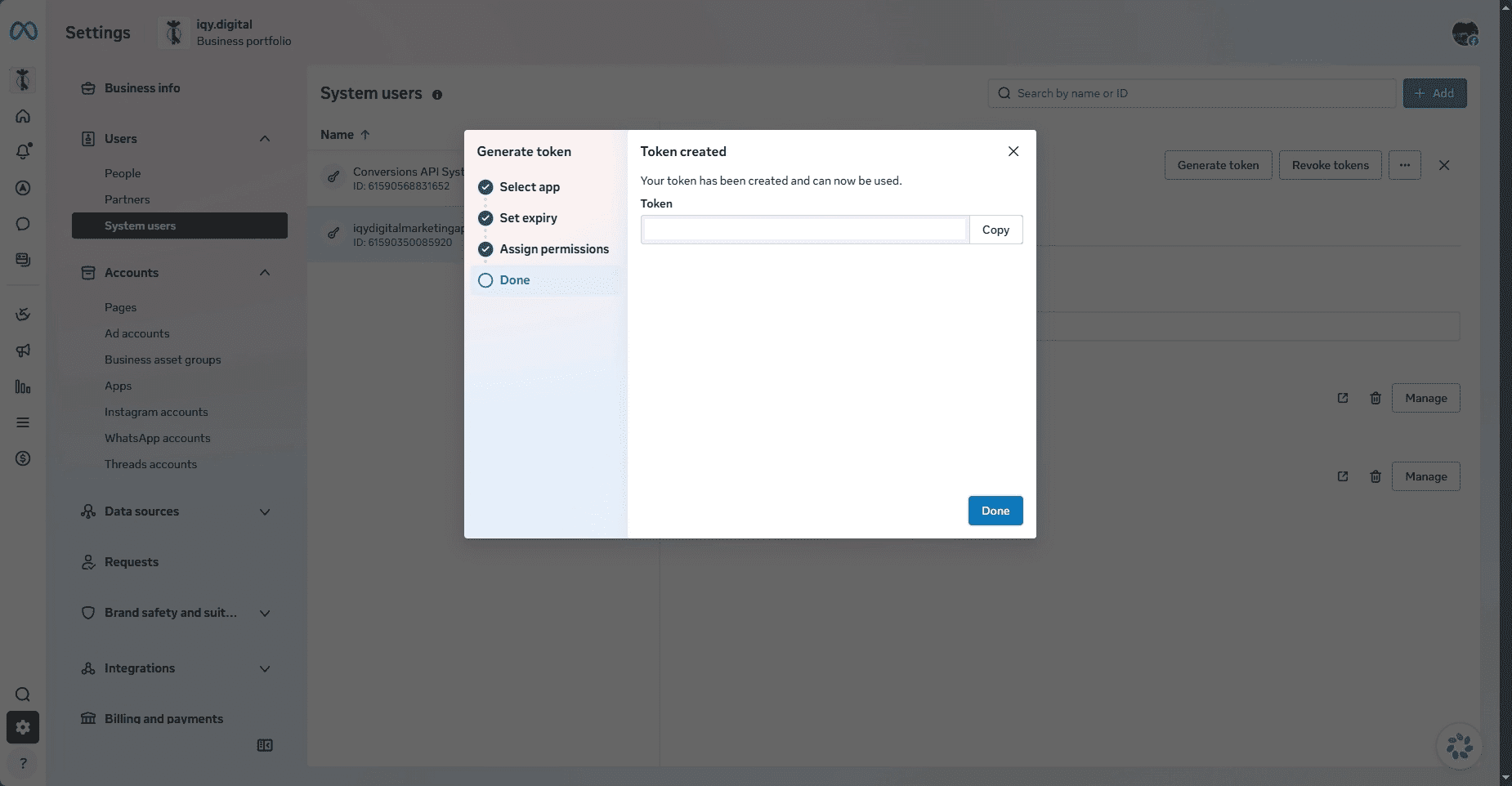
Please store that token in password manager.
Verify before you build
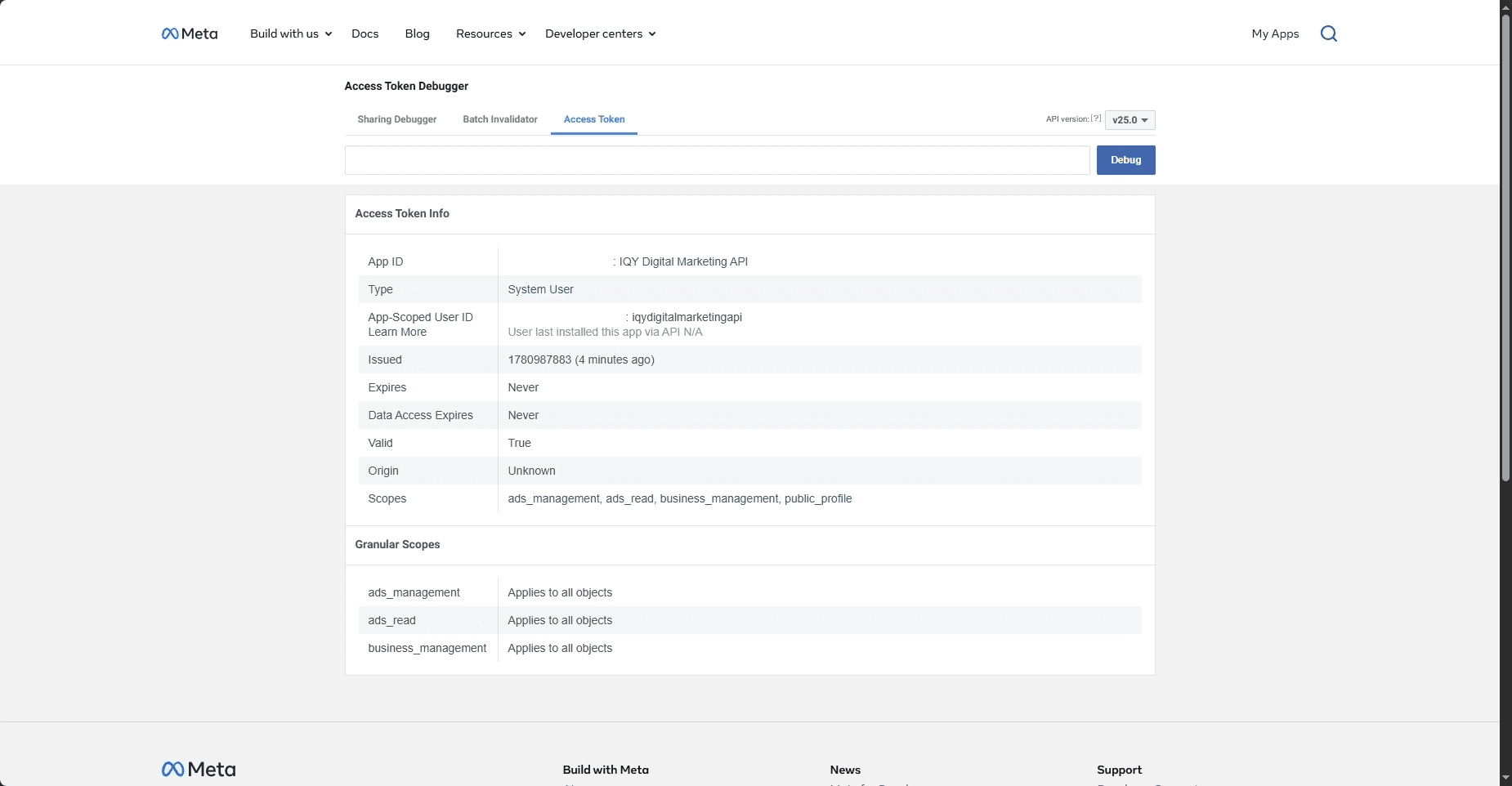
Before writing integration code, paste the token into the Access Token Debugger. For a correctly set up system user token you should see Type: System User, Expires: Never, Valid: True, and your three scopes listed. If a scope is missing, regenerate the token from Business Manager with the right boxes checked. Two minutes of checking here saves an hour of decoding cryptic permission errors later because error code 200 in particular tells you almost nothing about which permission is missing.
First call
Sanity-check the whole chain by listing the ad accounts your token can see in Meta Graph API Explorer:
GET https://graph.facebook.com/v25.0/me/adaccounts?fields=id,name,account_status
?fields=id,name,account_status
&access_token=YOUR_TOKEN
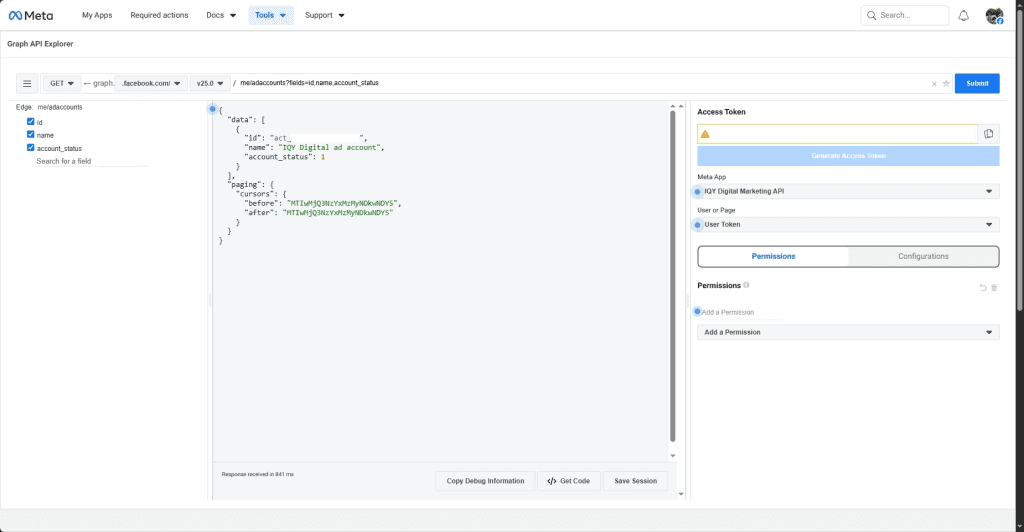
If you get back an array of account objects with IDs and names, everything works from app, token, permissions, Business Manager link. That means you’re in. the matrix. Just kidding though.
Creating Campaigns Programmatically
Meta’s structure has three levels, and the API enforces the order: campaign first, then ad sets inside it, then ads inside those.
The campaign object
A campaign mostly defines the objective. The fields you actually need at creation time are objective, name, status, and special_ad_categories (which is required even when empty, yes, really).
POST https://graph.facebook.com/v25.0/act_{ad_account_id}/campaigns
{
"name": "seo_leads_jabodetabek",
"objective": "OUTCOME_LEADS",
"status": "PAUSED",
"special_ad_categories": [],
"buying_type": "AUCTION",
"daily_budget": 250000,
"bid_strategy": "LOWEST_COST_WITHOUT_CAP"
}
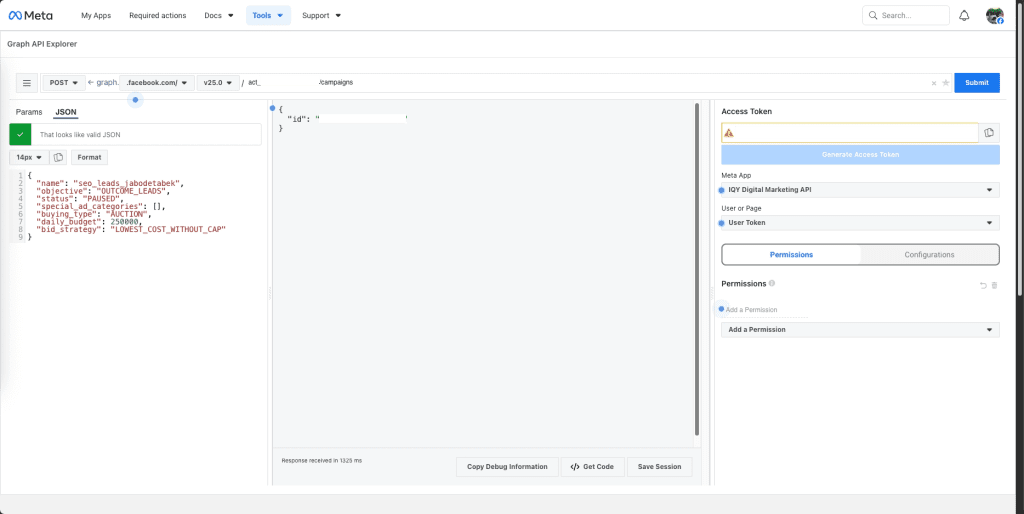
Create everything in PAUSED status. Spend should never go live while you’re still wiring up the layers underneath, and an active campaign with a half-configured ad set is exactly the kind of mistake you only make once. You can also further verify that code in Meta Ads Manager.
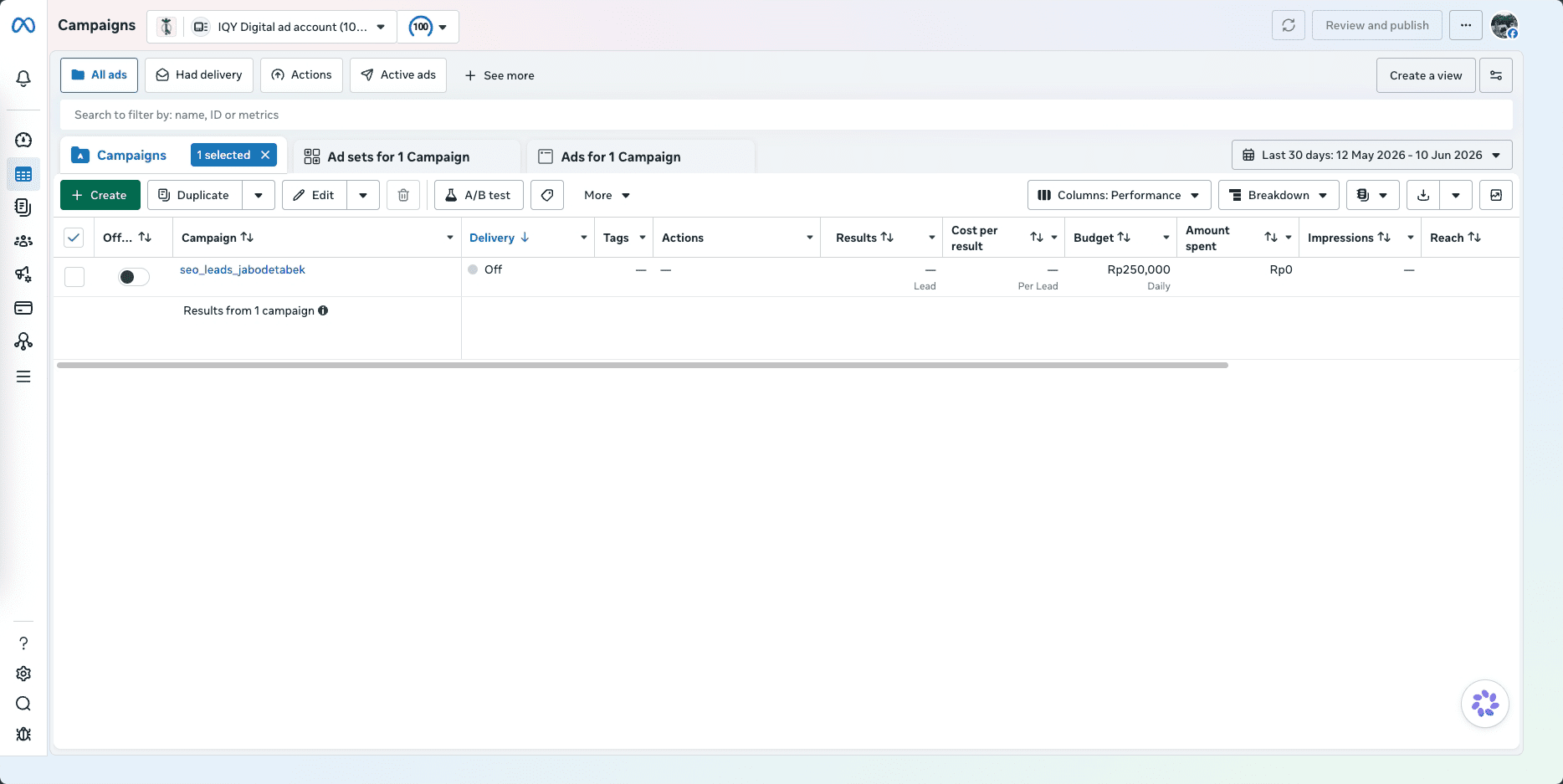
Objectives now follow the ODAX naming scheme: OUTCOME_AWARENESS, OUTCOME_TRAFFIC, OUTCOME_ENGAGEMENT, OUTCOME_LEADS, OUTCOME_APP_PROMOTION, OUTCOME_SALES. The legacy names — LINK_CLICKS, CONVERSIONS, and the rest — are dead. Per Meta’s v21.0 release notes, new ad sets and ads using non-ODAX objectives have been blocked since v21.0 (October 2024), and current API versions reject them outright. If an older tutorial uses them, that’s your cue to find a newer tutorial.
Ad sets
This is the configuration-heavy level and where most of your debugging hours will go. An ad set carries budget, schedule, audience, placements, and the optimization goal.
POST https://graph.facebook.com/v25.0/act_{ad_account_id}/adsets
{
"name": "seo_leads_jabodetabek",
"campaign_id": "campaign_id",
"status": "PAUSED",
"billing_event": "IMPRESSIONS",
"optimization_goal": "LEAD_GENERATION",
"bid_strategy": "LOWEST_COST_WITHOUT_CAP",
"start_time": "2026-06-17T00:00:00+0700",
"dsa_beneficiary": "IQY Digital",
"dsa_payor": "IQY Digital",
"promoted_object": {
"page_id": "page_id"
},
"targeting": {
"age_min": 25,
"age_max": 55,
"genders": [0],
"geo_locations": {
"regions": [
{"key": "1462", "name": "Jakarta"},
{"key": "1838", "name": "West Java"},
{"key": "1841", "name": "Banten"}
],
"location_types": ["home", "recent"]
},
"locales": [25],
"interests": [
{"id": "6003232518610", "name": "Digital marketing"},
{"id": "6003195797498", "name": "Entrepreneurship"},
{"id": "6003370636074", "name": "Search engine optimisation (software)"}
],
"targeting_automation": {
"advantage_audience": 0
}
}
}
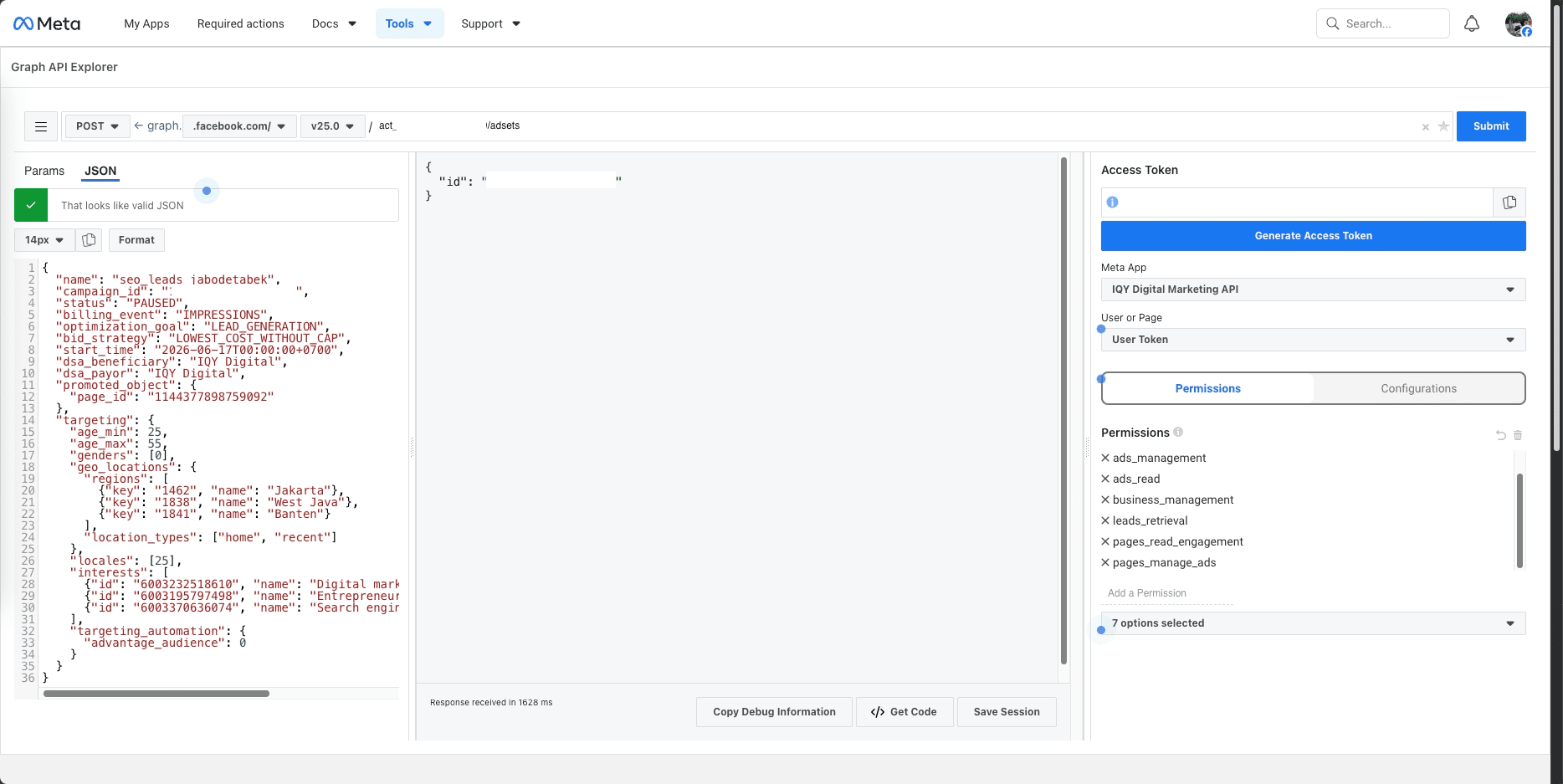
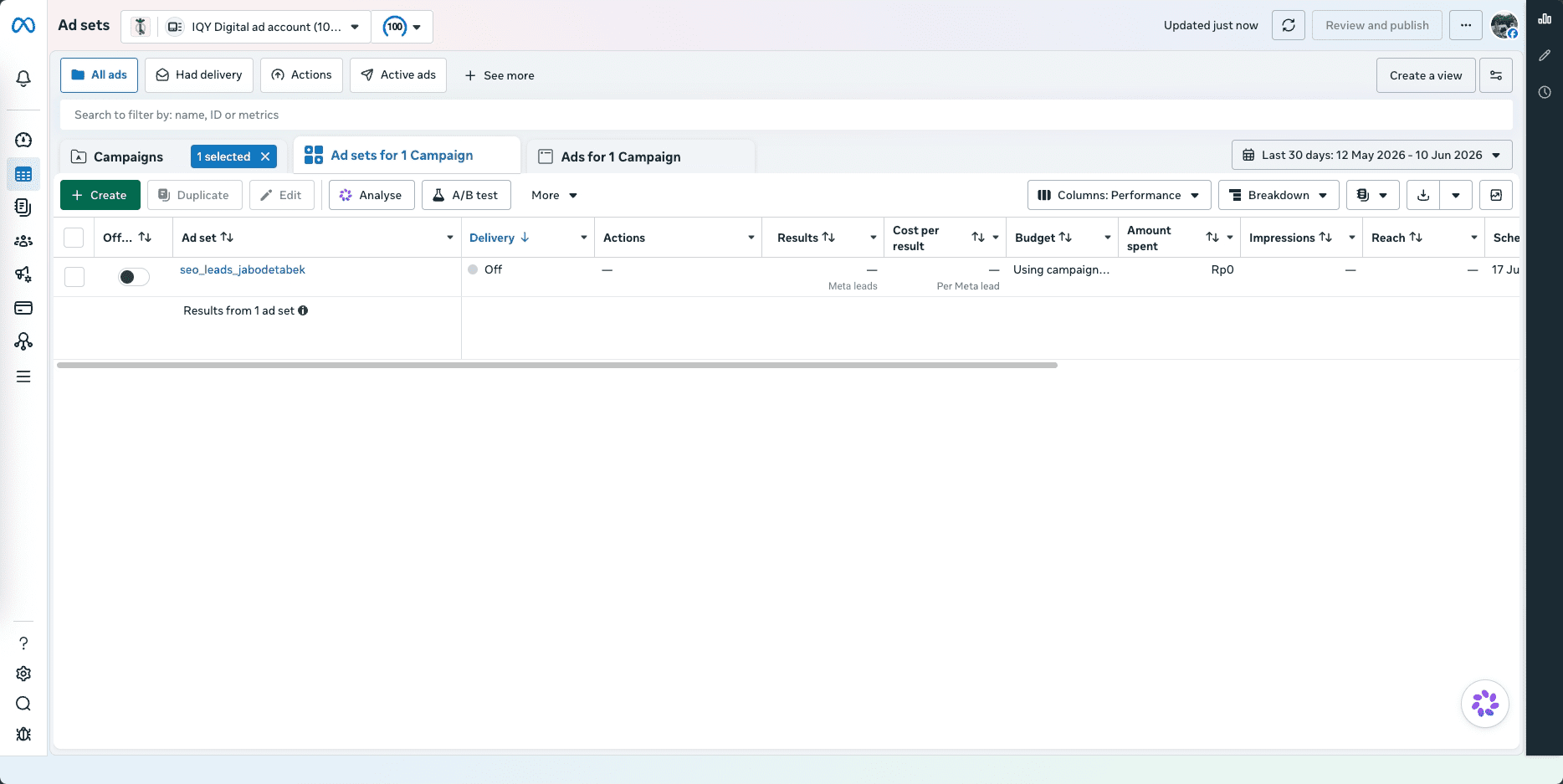
The fields that matter:
campaign_id– returned from the campaign creation calldaily_budgetorlifetime_budget– in the smallest currency unit, so cents for USD; sending50when you meant fifty dollars buys you fifty cents of reachbilling_event– almost alwaysIMPRESSIONSoptimization_goal,OFFSITE_CONVERSIONS,LINK_CLICKS,REACH, and so ontargeting– a JSON object covering geo, age, interests, placementsstart_time/end_time– Unix timestampspromoted_object– mandatory for conversion campaigns; this is where you specify the pixel and event
Ads and creatives
An ad is the join between a creative and an ad set. Creatives can be defined inline or created once as standalone objects and referenced by ID. At any kind of scale, do the latter. One creative attached to many ads keeps the account clean and your code shorter. The creation call itself is small: adset_id, a creative_id or inline spec, name, and status (paused, as always, during setup).
Batching
Creating objects one request at a time gets old immediately. The Graph API accepts batch requests up to 50 sub-requests in a single HTTP call, each with its own method, path, and body, with responses returned as an array. Spinning up 200 ads for a creative test, or repricing 50 ad sets, goes from minutes to seconds.
Batches also support dependency chaining: a sub-request can reference an earlier sub-request’s output with {result=N:$.id} syntax. That means campaign-plus-ad-set in one round trip instead of two.
The Insights API
This is the specific API use for reporting. Impressions, clicks, spend, conversions, cost per result, and ROAS or for any object at any level of the hierarchy.
The single most important thing to internalize: Insights is asynchronous. You POST a report request, receive a report_run_id, poll until the job status says completed, then fetch results from the corresponding insights edge. Architect around that from the start, because retrofitting polling logic into a pipeline that assumed synchronous responses is miserable.
A typical request:
POST https://graph.facebook.com/v25.0/act_{ad_account_id}/insights
{
"level": "ad",
"date_preset": "last_30d",
"fields": "ad_id,ad_name,impressions,clicks,spend,actions,cost_per_action_type",
"time_increment": 1
}
Set level explicitly every single time like account, campaign, adset, or ad. The default varies by endpoint, and silent defaults that vary are how reporting bugs are born. date_preset handles relative ranges (yesterday, last_7d, last_30d, this_month).
For exact dates use time_range with since/until instead. time_increment: 1 gives daily rows, monthly aggregates, and omitting it collapses the whole range into one row. breakdowns splits by age, gender, country, publisher_platform, device_platform, placement and more. Combinations are allowed but not all of them, and the error messages won’t always explain which rule you broke. filtering trims the result set, useful for things like “only ads above a spend threshold.”
The actions array
Something the official docs underplay: conversion data doesn’t arrive as flat columns. It’s nested in an actions array, where each element pairs an action_type (offsite_conversion.fb_pixel_purchase, link_click, etc.) with a value. Extracting specific conversion events is post-processing you write yourself. Plan for it.
Attribution windows
The same campaign can report meaningfully different numbers depending on attribution settings. Meta supports 1-day click, 7-day click, 1-day view, and 7-day view windows. If your pipeline needs run-over-run comparability, pin action_attribution_windows explicitly. Otherwise, at some point, two reports of the same campaign will disagree and you’ll lose an afternoon discovering why.
The Conversions API
Technically the Conversions API (CAPI) is a separate product from the Marketing API. Practically, it’s often the piece that decides whether your whole Meta integration delivers value, so it belongs in this guide.
The backstory matters. For years the Meta Pixel, a JavaScript snippet firing PageView, AddToCart, Purchase events from the browser was the entire tracking story. Then third-party cookie restrictions, ad blockers, and iOS 14’s App Tracking Transparency started eating those events. According to Meta’s own measurement research, browser-side pixel signals were degraded significantly following iOS 14, independent analyses put conversion signal loss in the 20–40% range for many advertisers. At that point Meta’s optimization is flying with a fogged windshield, and your CPAs show it.
CAPI’s answer is to move event transmission server-side. Events go out as POST requests from your server to Meta’s /events endpoint with each one carrying an event name, a Unix timestamp, hashed user identifiers (email, phone, IP, user agent — SHA-256 hashed before leaving your server, so raw PII never travels), custom data like purchase value and currency, and the source URL. Nothing in the browser means nothing for ad blockers or iOS to intercept.
Run it alongside the pixel with deduplication
The recommended architecture is redundancy: keep the pixel for its immediacy, send CAPI events as the reliable backstop. The catch is that running both without deduplication double-counts conversions, which quietly corrupts Meta’s optimization. The fix is a shared event_id you generate once and pass to both the pixel call and the CAPI call for the same conversion; Meta collapses matching IDs into a single event. Get this working before launch. If your CPAs suddenly look too good to be true after enabling CAPI, this is almost certainly why.
If you already have a Marketing API integration, adding CAPI is a modest lift, same token format, same Graph API base URL, same app. Meta’s official Conversions API documentation reports improved event match quality scores and more efficient delivery when CAPI supplements the pixel.
Advantage+ via the API
Advantage+ is Meta’s family of AI-driven campaign types, automating decisions advertisers used to make by hand — targeting, placements, creative selection, budget split. Whatever your feelings about handing the wheel to Meta’s machine learning, this is unambiguously the direction the platform is moving, and everything is reachable through the API.
Advantage+ Shopping Campaigns (ASC) are the flagship, aimed at e-commerce. You supply creatives and a conversion event; Meta decides audience, creative rotation, and the prospecting/retargeting split. Via the API, set OUTCOME_SALES as the objective and include the ASC-specific parameters — "is_skadnetwork_attribution": true for app campaigns. Structurally, ASC ad sets accept much broader audience definitions and deliberately strip out manual targeting controls.
Advantage+ Audience replaces hard targeting constraints with an optional “suggestion” Meta is free to override when it predicts better performance elsewhere. Enable it inside the ad set’s targeting spec: "targeting_optimization_types": [{"targeting_optimization_type": "ADVANTAGE_AUDIENCE"}].
Advantage+ Creative lets Meta modify your assets example features like crops, backgrounds, text variants, overlays like social proof labels. It’s switched on at the ad level with "advantage_plus_creative_spec" in the creative object. If your integration manages creative at scale, this reframes the job: you’re supplying a palette, not a finished asset.
So when do you use it? Advantage+ trades control for efficiency, and the trade pays off when conversion volume is healthy, Meta’s guidance is 50+ conversions per week per ad set for the optimization to stabilize. Manual campaigns remain the right call for hypothesis testing, variable isolation, and brand work with placement constraints.
Rate Limits, Errors, and the Stuff That Breaks at 1am (Maybe)
Nobody’s favorite section, and the one that separates integrations that survive production from those that don’t.
Rate limits
The Marketing API uses Business Use Case (BUC) rate limiting, which is not a flat calls-per-minute counter. Meta computes a call budget per app based partly on the number of active ad objects in the accounts it manages — bigger, busier accounts get more headroom. Your current standing comes back in every response’s headers: x-business-use-case-usage for the BUC category and x-app-usage at the app level. Read them. When usage creeps past 80%, throttle yourself, because once Meta does it for you (error 17) the only remedy is waiting.
Error codes worth memorizing
| Code | Meaning | What to do |
|---|---|---|
| 190 | Invalid/expired token | Regenerate. Do not retry — the token won’t resurrect itself |
| 200 | Permission error | Check token scopes and account access |
| 4 / 17 | App / user request limit | Exponential backoff, then retry |
| 100 | Invalid parameter | Check field names against the docs for your version |
| 1 | Unknown error | Brief delay, retry; escalate if persistent |
| 368 | Policy block | Review the ad content against Meta’s policies |
Recurring gotchas
A few issues come up often enough to list. “Invalid OAuth access token” on a system user token usually means a Business Manager permission change or security event invalidated it, you can try regenerate and update your stored copy. Insights returning all zeros is usually attribution window settings or a date range with no data; fresh pixels also need 24–48 hours before anything populates. “Objective not supported” on campaign creation means you’re using a deprecated legacy objective name, switch to ODAX.
And the sneakiest one: batch requests always return HTTP 200 at the top level, even when sub-requests inside failed. The failures are buried in individual response objects in the array. Check every item’s code field, or your system will happily mark failed operations as successful and you’ll find out from a confused client instead of a log line.
Meta Marketing API version
Meta ships a new API version roughly quarterly, and each lives about two years before deprecation. As of June 2026, v25.0 is the current stable version for new integrations and it carries significant breaking changes worth knowing before you upgrade:
- v21.0 introduced ODAX enforcement – non-ODAX objectives can no longer be created
- v22.0+ brought field-level deprecations across creative endpoints (
instagram_actor_id,effective_instagram_story_id, and others removed) - v25.0 enforced Automation Unification – Advantage+ Shopping and Advantage+ App campaigns can no longer be created or updated through any Marketing API version as of May 2026, requiring migration to the new unified Advantage+ setup. The same release also introduced the forthcoming Page Viewer Metric (rolling out end of June 2026), which will replace the legacy reach metric across Facebook and Instagram so developers should begin planning migration to
page_total_media_view_uniquenow.
If your codebase is still on v20.0 or earlier, upgrading directly to v25.0 will likely break campaign creation if you use ASC or AAC structures. Step through versions and validate each one before moving to the next. In my view this is the most underrated cost of running a Marketing API integration, these systems rarely break because of bugs in your code. They break because a version aged out and nobody updated a base URL.
Multi-Account Workflows for Agencies
Agencies face a structural problem solo advertisers never see: many client accounts, each with its own permissions, reporting needs, currencies, and quirks. The API has patterns for this, and the permission architecture is where to start because everything else hangs off it.
Partner access, not credential sharing
The correct model: your agency’s Business Manager requests partner access to the client’s ad account, the client approves it from their side, and your system user token gains access. The client can revoke at any time without touching your other accounts, Business Manager keeps per-account audit trails, and no client credentials ever leave the client’s control. Every alternative to this model is worse, and several are policy violations.
One system user, many accounts
You don’t maintain a token per client. A single system user, granted permissions across all approved client accounts, authenticates everything, the target account is specified per-call via the act_{ad_account_id} path. For each new client, either they add your Business Manager as a partner under Business Settings → Ad Accounts → Partners, or you send the access request through the API (requires business_management scope).
Reporting across fifty accounts
The naive approach for one Insights call per account, sequentially that is slow and chews through rate limits. Two patterns fix it. Where your Business Manager has admin access, some Insights queries run at the Business level and return per-account data in a single call. For everything else, exploit the fact that Insights is async anyway: fire job requests across all accounts simultaneously, collect the report_run_ids, and poll as they complete. Fanning out across 50 accounts costs nothing extra, and results arrive as they finish instead of queueing.
Expect variation
No two client accounts are configured the same, and your integration has to assume that. Read that again. Pixels will be missing on accounts where the client swears one is installed. Spend comes back in each account’s native currency, not yours. Accounts can be DISABLED or UNSETTLED, and only ACTIVE ones accept campaign creation. And Insights date ranges are interpreted in the ad account’s time zone, not UTC. In my experience, this last one generates more confused back-and-forth than every other item on this list combined.
FAQ
Is the Marketing API free?
The API itself, yes. You pay for ad spend exactly as you would otherwise; the API is just a different interface to the same account.
Do I need App Review?
Not for working with your own ad accounts because development mode allows every Marketing API permission without review. Review becomes mandatory when your app touches other users’ or businesses’ data, e.g. a SaaS product managing campaigns for customers.
Marketing API vs. Graph API, Chad what’s the difference?
The Graph API is Meta’s general-purpose API across all its platforms. The Marketing API is a specialized layer on top, scoped to advertising. Same infrastructure, same base URL.
Where’s my ad account ID?
Top navigation in Ads Manager, and in the URL, format act_XXXXXXXXXX. The act_ prefix is required in API calls, not decorative.
How often do new versions ship?
Quarterly, each supported for about two years. Deprecation dates are announced ahead of time via the changelog and emails to app admins.
Does this cover Instagram ads?
Correct.
Best token type for production?
Use system user tokens.
What about iOS 14?
The API itself is unaffected, your calls come from a server, not a user’s device.